UCP is an actively evolving protocol — capabilities, naming, and merchant onboarding processes may change. This checklist reflects UCP version 2026-08-25, checked September 2026. We update this guide when the spec changes.
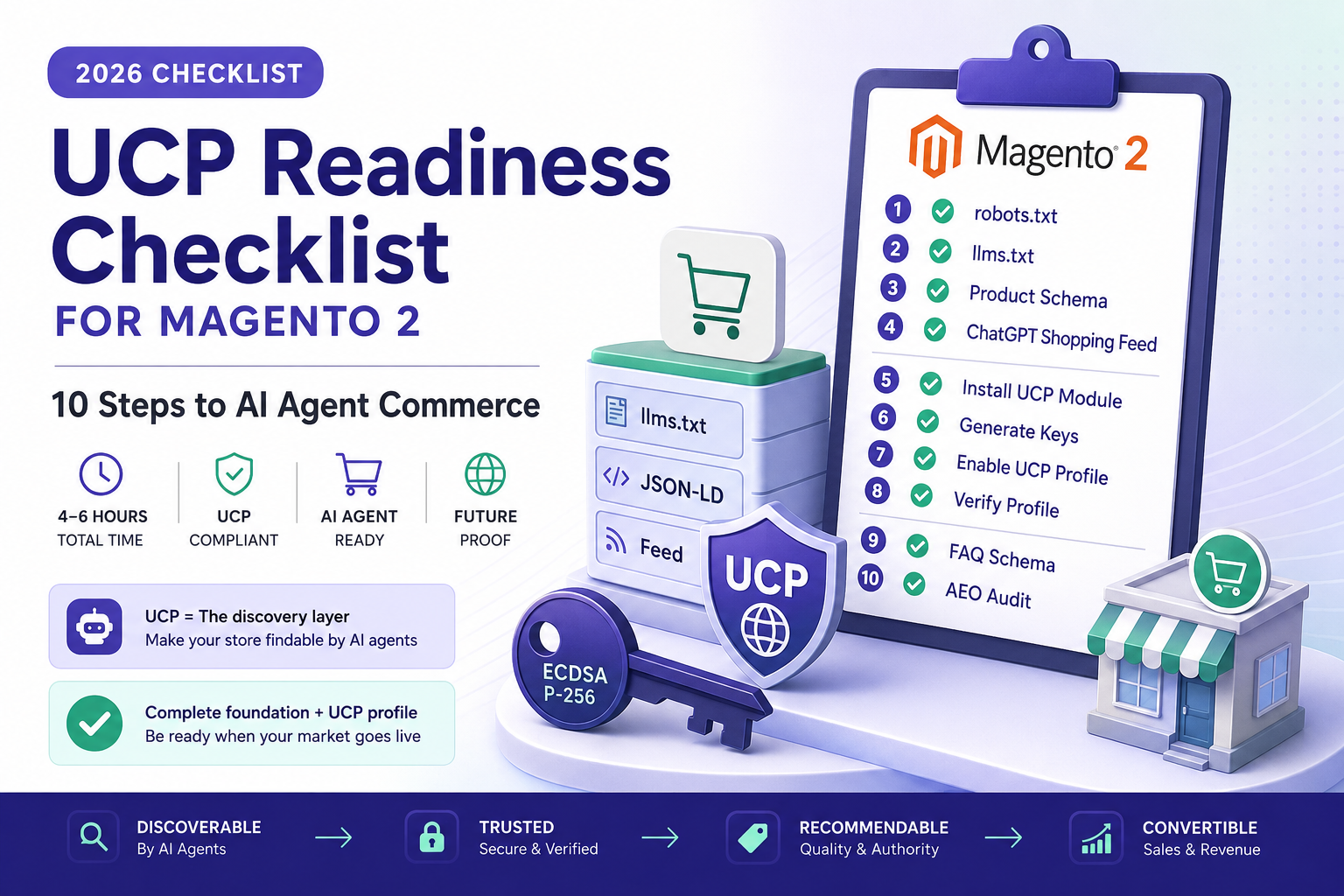
TL;DR — 2 minute version
- UCP readiness is not just installing a module — it requires AEO foundations first (robots.txt, llms.txt, schema, feed)
- Steps 1–4 are AEO foundations that also benefit Google Search, ChatGPT, and Perplexity visibility
- Steps 5–8 are UCP-specific: module installation, key generation, profile enablement, verification
- Steps 9–10 are optimisation: FAQ schema and a full AEO audit
- Estimated total time: 4–6 hours (excluding OpenAI’s ACP feed approval timeline)
- UCP discovery ≠ UCP recommendation. Completing this checklist makes your store findable — not automatically recommended
Universal Cart has begun rolling out in the US as of May 19, 2026. Canada and Australia are next, per Google’s announcements. The UK is expected to follow.
If your Magento store has not implemented UCP, it cannot be discovered by AI agents using the UCP protocol — which Google is deploying across Search AI Mode, Gemini, and YouTube Shopping. This does not mean your store is invisible to all AI systems — Google Merchant Center feeds, direct crawling, and schema still matter — but UCP is an additional discovery layer that is growing in importance.
This checklist covers the ten steps between a default Magento installation and a UCP-compliant store. Some take five minutes. Some take a few hours. All steps can be implemented on your existing Magento installation.
This guide is part of the Merchant-Controlled AEO architecture. For a plain-English explanation of what UCP is and why it matters, see What Is UCP? A Store Owner’s Guide.
Before UCP: the foundation (Steps 1–4)
UCP is the roof. These four steps are the foundation. Without them, UCP has nothing to build on — a UCP profile without indexed content and structured product data is a door with nothing behind it.
These steps also improve your visibility in Google Search, ChatGPT, Perplexity, and Claude — they are valuable regardless of whether you implement UCP.
Step 1 — Unblock AI crawlers in robots.txt
Time: 5 minutes
Why it matters: AI agents and crawlers need permission to access your store. Magento’s default robots.txt blocks most of them.
Open yourstore.com/robots.txt and verify that these bots are explicitly allowed:
OAI-SearchBot is ChatGPT’s search crawler. Google’s AI Mode and Gemini shopping use the normal Googlebot index and Merchant Center; Google-Extended is only a token for Gemini training and grounding. Each named group must repeat your Disallow lines, because it replaces the User-agent: * group for that bot (RFC 9309).
If any of these appear under a Disallow: / directive, fix it before proceeding. Everything else in this checklist is irrelevant if crawlers cannot reach your store.
Step 2 — Generate llms.txt
Time: 10 minutes (automated)
Why it matters: llms.txt tells AI systems what your store sells, in plain language. Without it, AI agents construct an approximate — and often inaccurate — model of your business.
The module generates both llms.txt and llms.jsonl from your live catalog automatically. Cron-scheduled to update when products change.
Verify: visit yourstore.com/llms.txt — you should see a structured summary of your store, categories, and key products.
Step 3 — Implement Product JSON-LD schema
Time: 1–2 hours
Why it matters: AI agents — and UCP specifically — rely on structured product data. JSON-LD is the format both Google and OpenAI prefer. Magento’s default uses microdata, which is less reliable for AI parsing.
Critical fields to include:
| Field | Why it matters |
|---|---|
name | Product name — used as the primary identifier |
description | Product description — AI agents read this to form recommendations |
offers.price | Current price — required for shopping comparisons |
offers.priceCurrency | Currency code — ambiguous pricing breaks AI agent trust |
offers.availability | Most common failure. ChatGPT Shopping and UCP both skip products without confirmed availability |
sku | Product identifier — used for cross-platform matching |
aggregateRating | Review score — affects recommendation confidence (if you have reviews) |
offers.availability missing. This one field determines whether AI agents consider your product purchasable. Without it, your products may be skipped entirely — regardless of how complete the rest of your schema is.
Step 4 — Submit product feed for ChatGPT Shopping
Time: 30 minutes + 1–4 weeks approval
Why it matters: ACP and UCP serve different platforms but share the same foundation. A submitted product feed makes your products available for ChatGPT Shopping consideration. The product data you prepare — prices, availability, descriptions — is the same data UCP needs.
Submit your feed through chatgpt.com/merchants. Approval typically takes one to four weeks. Note: OpenAI has not published a stable, widely-documented merchant onboarding standard as of May 2026 — treat the submission process as evolving.
UCP implementation (Steps 5–8)
With the foundation in place, your store is ready for UCP. These steps add the protocol-specific discovery layer.
Step 5 — Install the UCP profile module
Time: 10 minutes
Why it matters: This is the discovery layer — the file at /.well-known/ucp that tells AI agents your store exists and what capabilities it supports.
Step 6 — Generate ECDSA signing keys
Time: 5 minutes
Why it matters: UCP requires cryptographic signing keys for secure communication between your store and AI agents. The module generates ECDSA P-256 keys — the same standard used by Apple Pay and Google Pay.
Since spec 2026-08-25 the public keys are published in the profile’s top-level keys[] array, an RFC 7517 JWK Set. Where the private key is stored depends on the module version: follow the module README. It never belongs in the profile itself.
Step 7 — Enable the UCP profile
Time: 2 minutes
Why it matters: The module installs disabled by default. You need to explicitly opt in.
Navigate to: Stores → Configuration → Angeo → UCP → General → Advertise UCP Profile: Yes
Advertise only the capabilities you actually serve. With angeo/module-ucp-catalog installed, catalog.search and catalog.lookup answer. Do not advertise cart or checkout until an endpoint exists: an agent will call what the profile declares.
Step 8 — Verify the profile
Time: 2 minutes
Why it matters: A malformed profile is worse than no profile — it signals to AI agents that your store is unreliable.
You should see a valid JSON response with version: "2026-08-25", your signing keys, and the dev.ucp.shopping service binding.
Run the built-in validator:
Green pass means your profile is spec-compliant. Non-zero exit means something needs fixing — the output tells you what.
What you have after Step 8
/.well-known/ucp. AI agents that support UCP discovery can find your store and read its capabilities.
This does not mean AI agents will immediately recommend your products. UCP discovery is one layer in a stack that also includes catalog quality, pricing, schema completeness, entity authority, and feed registration. Steps 9 and 10 address the most impactful remaining signals.
Think of Steps 1–8 as infrastructure. What you build on that infrastructure — product quality, content quality, brand authority — determines the commercial outcome.
Optimisation and monitoring (Steps 9–10)
Step 9 — Answer real buyer questions on key pages
Time: 1–2 hours
Why it matters: Clear answers to real buyer questions – shipping, returns, sizes, compatibility – give assistants something concrete to quote. FAQPage markup is optional: it helps parsers, but Google has shown no FAQ rich results since May 2026.
Add short Q&A sections to:
- Your top 10 category pages (by revenue)
- Your top 20 product pages (by revenue)
- Your homepage
Each FAQ section should contain 3–5 questions with direct, factual answers. Use the questions your customers actually ask — shipping times, return policies, size guides, compatibility, care instructions.
Step 10 — Run a full AEO audit
Time: 30 seconds
Why it matters: Steps 1–9 cover the individual components. The CLI audit scores your store across 20 AEO signals and shows where gaps remain.
Or use the web-based audit — no installation required:
See exactly where the gaps are
The free scan checks 14 signals — robots.txt, llms.txt, schema, feeds, UCP profile, and more. A few seconds.
Run free AEO audit →Target: 85%+ AEO score with UCP profile active.
The complete picture
| Step | Time | Impact | Also benefits |
|---|---|---|---|
| 1. robots.txt | 5 min | Prerequisite — without this, nothing works | ChatGPT, Perplexity, Claude |
| 2. llms.txt | 10 min | AI agents understand your store correctly | All AI platforms |
| 3. JSON-LD schema | 1–2 hrs | Products are parseable and purchasable | Google Search, ChatGPT Shopping |
| 4. ACP feed | 30 min + wait | ChatGPT Shopping visibility | ChatGPT |
| 5. UCP module | 10 min | Google AI discovery layer | UCP-specific |
| 6. Signing keys | 5 min | Secure agent communication | UCP-specific |
| 7. Enable profile | 2 min | Go live on UCP | UCP-specific |
| 8. Verify | 2 min | Confirm spec compliance | UCP-specific |
| 9. FAQ schema | 1–2 hrs | Higher citation rate in AI answers | All AI platforms, Google Search |
| 10. Full audit | 30 sec | Identify remaining gaps | Everything |
Total estimated time: 4–6 hours for a complete implementation, including ACP registration (excluding OpenAI’s approval timeline of 1–4 weeks).
What comes next
angeo/module-ucp 2.x publishes the profile (spec 2026-08-25) and angeo/module-ucp-catalog serves catalog search and lookup. Cart and checkout endpoints come later, as the specification settles.
Planned roadmap (subject to UCP spec evolution)
The UCP specification is under active development. This roadmap reflects current planning as of May 2026 and may change as the protocol matures.
| Target version | Planned capability | Status |
|---|---|---|
| 0.2.x | Catalog search endpoint — AI agents can search your products | In development |
| 0.3.x | UCP-Agent header parsing and capability negotiation | Planned |
| 0.4.x | HTTP Message Signatures (RFC 9421) | Planned |
| 0.5.x | Cart capability | Planned |
| 1.0.0 | Full shopping vertical — catalog, cart, checkout, order | Dependent on spec stability |
Release dates are not committed. Each version will be tested against the current UCP conformance suite before release.
Each release will be announced on the angeo.dev blog and on Packagist. The module is MIT-licensed — no licensing fees, no SaaS subscriptions, no external data transmission.
gtstudio/module-ucp module includes checkout session endpoints, quote management, and UcpSession persistence in its current release. If you need functional checkout capability today rather than profile-only discovery, it may be the better fit. See its Packagist page for details. Both modules implement the same UCP specification — the difference is scope and release strategy.
Related guides
Frequently asked questions FAQ schema
composer and bin/magento commands. If you have a development team or agency, this is routine Magento module management. Steps 3 and 9 require template modifications or a schema module. Step 10 (the audit) can be run by anyone via the web-based tool.module-aeo-audit, module-llms-txt, module-openai-product-feed, module-rich-data, and module-robots-txt-aeo. No conflicts. They share configuration conventions but operate independently.