There’s a shift happening in e-commerce search that most Magento store owners haven’t noticed yet.
When a customer types “best ergonomic office chair under €500” into Google, they get a list of blue links. When they ask the same question to ChatGPT or Perplexity, they get a curated answer — with specific product recommendations, comparisons, and sometimes direct links to stores.
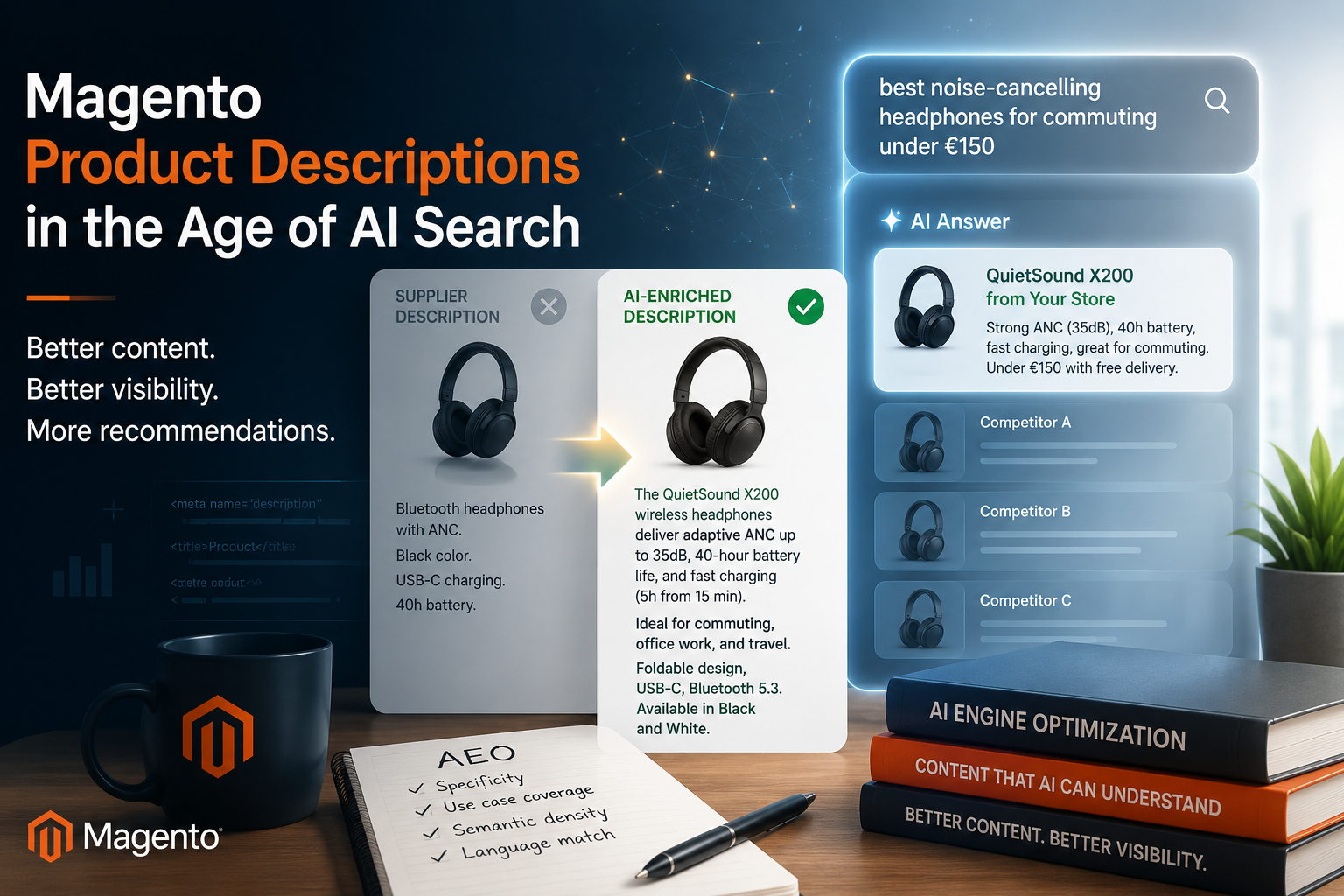
The stores that appear in those AI answers share one thing in common: rich, specific, well-structured product content. The stores that don’t? Most of them have descriptions that look like this:
The content gap that’s costing you AI visibility
Here’s a real-world example of what the problem looks like:
Bluetooth headphones with ANC.
Black color. USB-C charging.
40h battery.
The QuietSound X200 wireless headphones
combine adaptive active noise cancellation
with 40-hour battery life, making them the
ideal companion for daily commuting,
open-plan office work, and long-haul flights.

The dual-microphone array filters ambient
noise at up to 35dB, while USB-C fast
charging delivers 5 hours of playback
from a 15-minute charge.
The difference isn’t cosmetic. The second description gives the AI model use cases, specific features, differentiators, and purchase context — exactly what it needs to form a confident recommendation.
Here’s what that looks like when a real query hits an AI assistant:
The enriched description gave the model specific, retrievable signals: use case, technical spec, battery claim, urgency detail, price context. The supplier description gave it nothing to work with. This is Answer Engine Optimization in its most concrete form.
Why manual AI workflows don’t scale
At this point, some merchants think: “I can just use ChatGPT and a CSV.”
You can — for 20 products. Here’s why that breaks at scale:
| Manual ChatGPT + CSV | module-ai-description-updater |
|---|---|
| Copy/paste per product | Fully automated CLI + cron |
| No store scope awareness | Per store view, per language |
| No attribute targeting | description, short_desc, meta fields |
| No retry handling | Built-in error recovery |
| No logging | Full per-SKU audit trail |
| No provider switching | 4 providers, zero code changes |
| Manual Magento import | Native attribute save per store scope |
| No Google Sheets sync | Bidirectional integration |
A store with 5,000 SKUs across three language store views means 15,000 individual description fields. The manual approach doesn’t survive contact with that reality. The module runs unattended overnight.
How the processing pipeline works
For developers evaluating this module, here’s the full per-product per-store-view flow:
-
Load batchN products from catalogue. Filter: only missing descriptions, or all — configurable.
-
Resolve store scopeIterate active non-admin store views. Inject
{{store_name}}into prompt. -
Build promptSystem role + user prompt template with product name, SKU, store name placeholders.
-
Call AI providerOpenAI / Claude / Gemini / Groq. Token limit, timeout, and retry count all configurable.
-
Validate responseNon-empty check, minimum word count, HTML structure check.
-
Save attributesWrites
description,short_description, and optional meta fields to the correct store view scope. -
Log resultStatus (updated / dry_run / skipped / error), provider, tokens, latency →
var/log/angeo_ai_description_updater.log
Architecture notes: synchronous CLI (no queue dependency), cron-safe batch sizing, dry-run mode writes nothing to DB, store scope isolation prevents cross-contamination.
Provider benchmark
Measured across a 100-product test batch (mixed categories, ~80 words output average):
| Provider | Model | Avg latency | Cost / 1,000 products | Quality |
|---|---|---|---|---|
| Groq | Llama 3.3 70B | ~1.8s | Free | Good |
| Gemini | 2.0 Flash | ~2.1s | Very low | Good |
| Claude | Haiku 4.5 | ~3.5s | Medium | Very good |
| OpenAI | GPT-4.1 Mini | ~4.2s | Low | Excellent |
Recommendation: start with Groq to validate quality at zero cost. Switch to GPT-4.1 Mini or Claude Haiku for production if your category needs higher output quality.
Results vary by prompt complexity, product category, and provider region. Use these as rough starting points.
Prompt template: what the AI actually receives
Default templates — fully editable per store view in Admin → Stores → Configuration → Angeo AEO.
System role:
You are an expert e-commerce copywriter. Write clear, benefit-focused
product descriptions that help customers make confident purchasing decisions.
Use HTML formatting. Avoid generic marketing language.
User prompt:
Write a professional and SEO-friendly product description for
"{{product_name}}" (SKU: {{product_sku}}) for our {{store_name}} online store.

Include:
- Key features and technical specifications
- Primary use cases and who this product is for
- Key benefits (not just features)
- Compatibility or size information where relevant

Format using HTML paragraphs. 150–250 words.
Do not include a headline — start directly with the first paragraph.
Different store views can hold different templates — enabling language-appropriate tone for each market without code changes.
Why this matters for Answer Engine Optimization
AEO applies the same principles as technical SEO — but to AI retrieval systems instead of search crawlers. AI models weight several signals when deciding whether to recommend a store:
- Specificity — does the description describe this product, or generic filler?
- Use case coverage — are the purchase contexts named explicitly?
- Semantic density — enough signal for the model to form a confident answer?
- Language match — content in the language the user is asking in?
Thin descriptions fail all four. AI-generated descriptions — when prompted correctly — pass all four, because they’re built from product context and written to be understood, not just indexed.
Open-source architecture: no SaaS, no lock-in
- Configurable prompts — full control over what the AI writes
- Extendable provider architecture — add a new provider by implementing one interface
- Developer-first — CLI-first, full logging, dry-run, CI-safe
- Magento-native — attribute saving, store scope, cron via Magento infrastructure
- No SaaS dependency — your API keys, your data, your server
- No per-seat pricing — install on as many stores as you run
Installation
composer require angeo/module-ai-description-updater
bin/magento setup:upgrade
bin/magento setup:di:compile
bin/magento cache:flush
Requires PHP 8.2+ and Magento 2.4.x.
Getting started in 5 minutes (free, no credit card)
Step 1 — Get a free Groq API key at console.groq.com. No credit card. Key starts with gsk_.
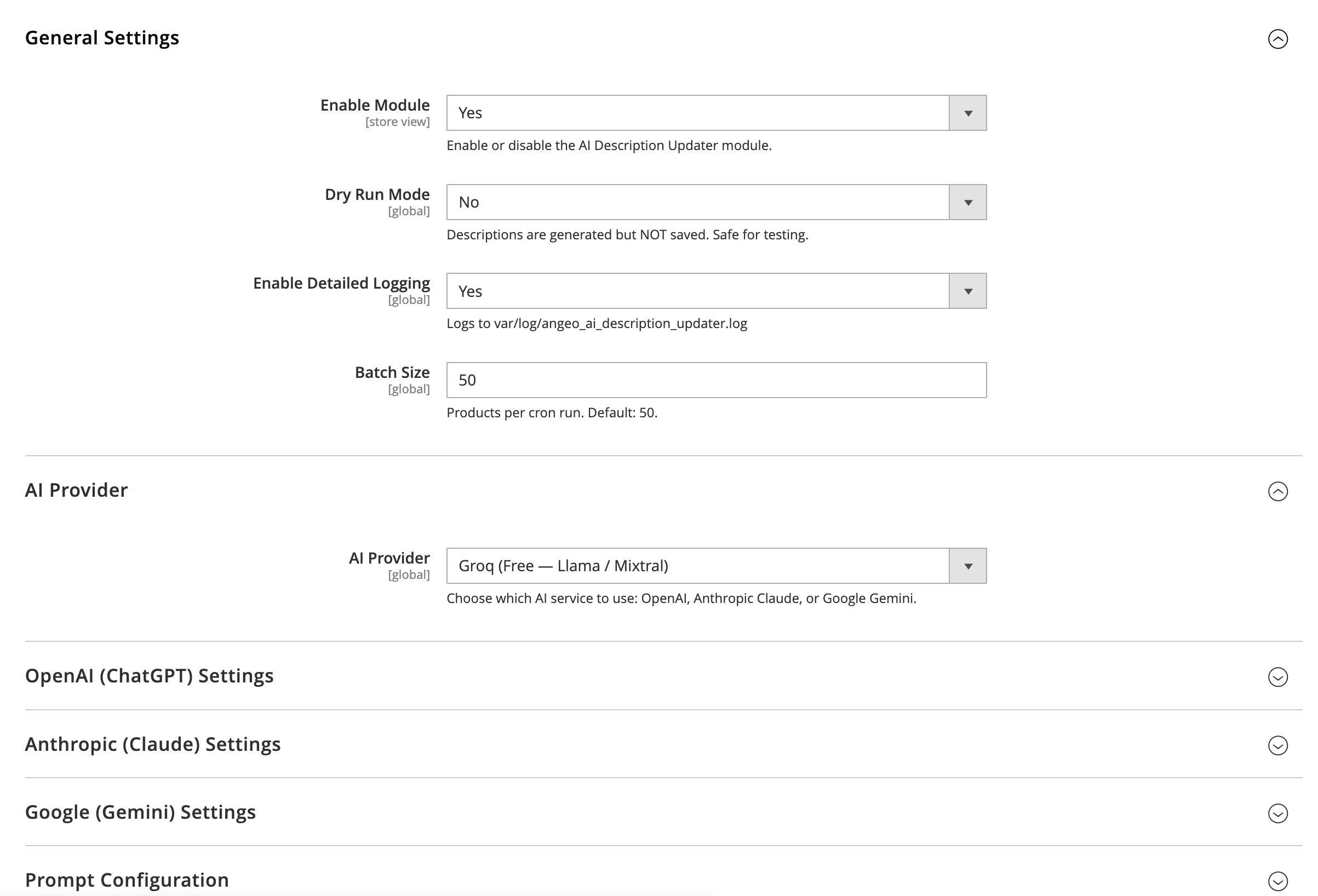
Step 2 — Configure: Stores → Configuration → Angeo AEO → AI Description Updater
- Enable Module →
Yes - Dry Run Mode →
Yes - AI Provider →
Groq - Groq API Key → paste
gsk_... - Generate Description →
Yes
Step 3 — Test on one product:
bin/magento angeo:ai-description:run --sku=YOUR-SKU --dry-run
tail -f var/log/angeo_ai_description_updater.log
Review output in the log. Tune prompt if needed. Disable dry-run when satisfied.
Step 4 — Run at scale:
# All products, all store views
bin/magento angeo:ai-description:run

# Specific store only
bin/magento angeo:ai-description:run --store=2

Step 5 — Automate: enable cron in config (0 2 * * *), set batch size, run unattended.
What the module includes
| Feature | angeo/module-ai-description-updater |
|---|---|
| Price | Free, MIT |
| AI providers | OpenAI, Claude, Gemini, Groq (free) |
| CLI automation | ✓ |
| Cron scheduling | ✓ |
| Multi-store / multi-language | ✓ |
| Dry-run mode | ✓ |
| Configurable prompt templates | ✓ per store view |
| Google Sheets input / export | ✓ |
| Full per-SKU logging | ✓ |
| Self-hosted, no SaaS | ✓ |
| meta_title / meta_description | ✓ optional |
Frequently asked questions
The module is fully compatible with both Magento 2 Open Source (Community Edition) and Adobe Commerce (Enterprise Edition). It uses only standard Magento APIs — no Commerce-only dependencies. Requires PHP 8.2+ and Magento 2.4.x.
Groq is completely free — no credit card required, no billing setup. You create a free account at console.groq.com, generate an API key, and start generating descriptions immediately. Groq’s free tier allows up to 14,400 requests per day, which covers even large catalogues when combined with cron scheduling. Google Gemini also has a free tier with daily limits. OpenAI and Anthropic Claude require paid API keys, but their per-request costs are very low for description generation.
By default, the module is configurable to process only products where the description field is empty — skipping any product that already has content. You can also enable overwrite mode explicitly if you want to regenerate all descriptions. Before running at scale, always use --dry-run first: it generates content and writes it to the log without touching the database, so you can review output quality before committing.
When you run the CLI command without a --store flag, the module iterates every active non-admin store view in sequence. For each store view, it resolves the {{store_name}} placeholder in your prompt template and saves the generated description to that store view’s scope — not the global default. This means a store with English, German, and French views gets three separate AI-generated descriptions per product. Each store view can also have its own prompt template, so tone and language are fully customisable per market.
Yes — both the system role prompt and the user prompt template are fully editable in the admin panel under Stores → Configuration → Angeo AEO → AI Description Updater. The system role sets the overall tone (e.g. “luxury brand copywriter”, “technical B2B writer”, “friendly consumer tone”). The user prompt controls what the model is asked to include. Different store views can have different prompt configurations, so your English store can have a different writing style than your German or French store.
With a default batch size of 50 products and one store view, a nightly cron run takes 5–10 minutes depending on the provider. A 5,000-product catalogue at 50 products/run reaches full coverage in 100 days of nightly runs — with zero manual effort after setup. For faster coverage, increase the batch size or run manually during off-peak hours. With Groq at ~1.8s per product, 50 products takes roughly 90 seconds of API call time.
SEO optimizes your content for search engine crawlers — improving keyword relevance, backlinks, and technical structure so Google ranks your pages higher. AEO (Answer Engine Optimization) applies the same principles to AI retrieval systems: ChatGPT, Perplexity, Gemini, and Claude. These systems don’t rank pages by keyword density — they read for meaning, use-case coverage, and semantic specificity. A product description that says “high quality, fast shipping” gives an AI nothing to cite. A description that names specific use cases, technical specs, and differentiators gives the AI the signal it needs to recommend your store in a response.
The module sends product name and SKU to whichever AI provider API you configure. No other product data (pricing, inventory, customer data) is transmitted. Your API key is stored in Magento’s encrypted configuration store. The module is self-hosted — there is no angeo.dev SaaS backend, no telemetry, and no data leaves your server except the direct API call to your chosen AI provider. You can review all API calls in the log file at var/log/angeo_ai_description_updater.log.
Yes. The module supports Google Sheets as a bidirectional integration. As input: maintain a public spreadsheet with SKUs in column A — the module reads from it instead of processing all active products. No Google service account is needed for input; “anyone with the link can view” is sufficient. As output: after each run, generated descriptions are written back to a spreadsheet for content team review before committing to production. The output integration requires a Google Cloud service account JSON key.
Use the companion module angeo/module-aeo-brand-visibility. It runs live queries to ChatGPT, Claude, Perplexity, and Gemini and scores your brand’s visibility across five signals: mentioned, recommended, URL cited, 1st position, and positive sentiment. The score (0–100, graded A–F) is stored in Magento’s Admin Panel with a full audit history, so you can track improvement over time as your descriptions are enriched.
Ready to make your catalogue AI-readable?
Free. MIT. Installs in 2 minutes. Works with Groq at zero cost.
Part of the angeo AEO Suite — open-source modules for Answer Engine Optimization on Magento 2. Also see angeo/module-aeo-brand-visibility to score your store’s actual presence in AI answers.
Continue reading:
- The technical reason: Why your Magento page is invisible to AI
- The implementation: Open source module to generate at scale