A live Magento 2 store went from a 20% to an 86% AEO score — and the first jump took under an hour. Here’s the exact sequence of changes, the full audit history, what we deliberately left untouched, and the one thing that quietly pulled the score back down.
TL;DR
- A default Magento 2 install scored 20% (“Critical”) for AI visibility — generative search engines were effectively locked out.
- With free, open-source modules it reached 86% (“Excellent”), tracked across 33 audits. The first two fixes alone — done in well under an hour — moved it from 20% to 37%.
- We expected structured data to do the heavy lifting. The first big jump actually came from a one-line
robots.txtchange. - The score later eased back to 79% (“Good”) — nothing broke; the files simply went stale. Freshness turned out to matter as much as correctness.
Methodology
Before the story, the setup — so the numbers are reproducible rather than anecdotal.
- Store
- Magento Open Source 2.4.x
- Environment
- Live demo store
- Period
- 7–27 June 2026 (calendar)
- Active work
- Hours, not days
- Audits
- 33 (29 in rolling 30 days)
- Tool
angeo:aeo:audit(open-source CLI)- Signals scored
- 15+, individually weighted
A word on timing, since it’s easy to misread. The audits span three weeks of calendar time, but that’s not how long the work took — most days nothing was touched. The hands-on effort was a handful of short sessions: the first two fixes took well under an hour and the full optimization a few hours spread across those sessions. That matches the rule of thumb we quote elsewhere — a typical mid-size store reaches a strong score in roughly 90 minutes of focused work. The calendar span here exists because we also wanted to observe what happens when a store is then left alone (see “the plot twist” below).
The brand-visibility checks rely on querying live AI models directly. As a registered member of the Anthropic Claude Partner Network, we test recall and citation against Claude, ChatGPT, Gemini and Perplexity as part of our day-to-day module work — so these measurements come from hands-on practice with the models, not secondhand reporting.
What we deliberately did not change
To isolate the effect of answer-engine optimization, everything outside it was held constant. We did not touch:
| Theme | Hosting / server | Page-speed work |
| Product copy | URL structure | Classic SEO settings |
Whatever moved the score moved because of the AEO layer alone — not faster pages or rewritten content.
What a 20% score actually means
“20%” sounds abstract until you translate it into how generative search treats the store:
→ ChatGPT may never discover the catalog in the first place.
→ Perplexity can crawl the pages but can’t reliably parse the products.
→ AI shopping agents have almost no structured data to trust, so they default to a competitor that does.
A store can rank #1 on Google and still land here. Classic SEO and answer-engine readiness are different disciplines: one optimizes for a ranked list of links, the other for being selected and quoted inside a single generated answer.
The starting point: 20%, nine failures
The first audit was blunt:
AEO Score: 20% — Critical
✓ Pass: 1   ⚠ Warn: 5   ✗ Fail: 9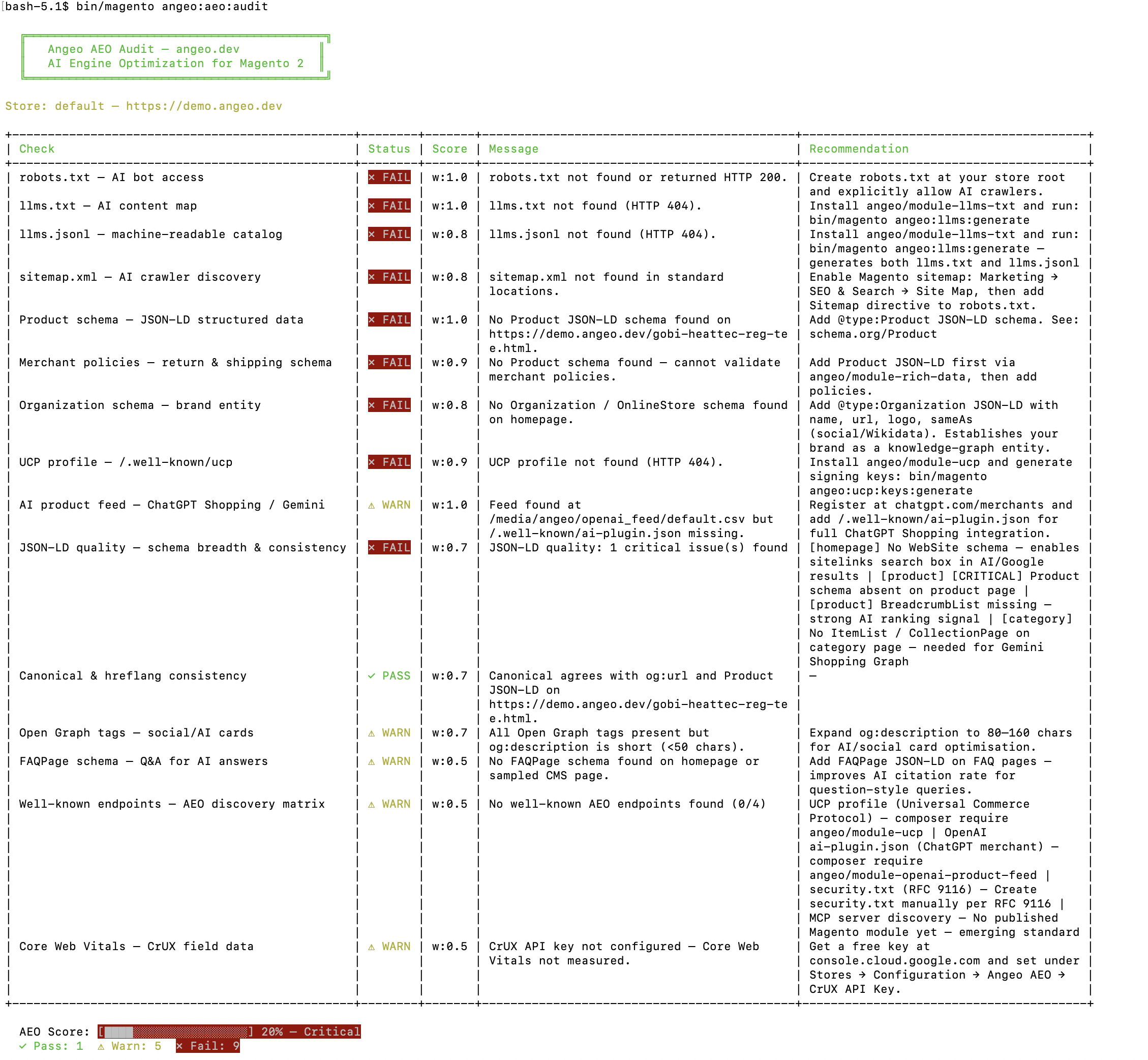
angeo:aeo:audit CLI — the literal out-of-the-box state, not a worst case staged for contrast.| Check | Status | What generative search sees |
|---|---|---|
| robots.txt — AI bot access | ✗ FAIL | No explicit rules for AI indexers |
| llms.txt — content map | ✗ FAIL | 404 — no map of the store |
| llms.jsonl — machine catalog | ✗ FAIL | 404 — no structured catalog |
| sitemap.xml | ✗ FAIL | Not in standard locations |
| Product JSON-LD | ✗ FAIL | No product schema on product pages |
| Merchant policies | ✗ FAIL | No schema to attach policies to |
| Organization schema | ✗ FAIL | No brand entity on the homepage |
| UCP profile | ✗ FAIL | 404 — no agentic-commerce profile |
| JSON-LD quality | ✗ FAIL | No WebSite, Product or BreadcrumbList |
The lone pass was canonical/hreflang consistency, which Magento handles natively. Everything an LLM needs to find, understand and trust the store was absent.
The climb: 20% to 86%
Because every change was re-audited, the trajectory is real telemetry, not a tidy reconstruction.
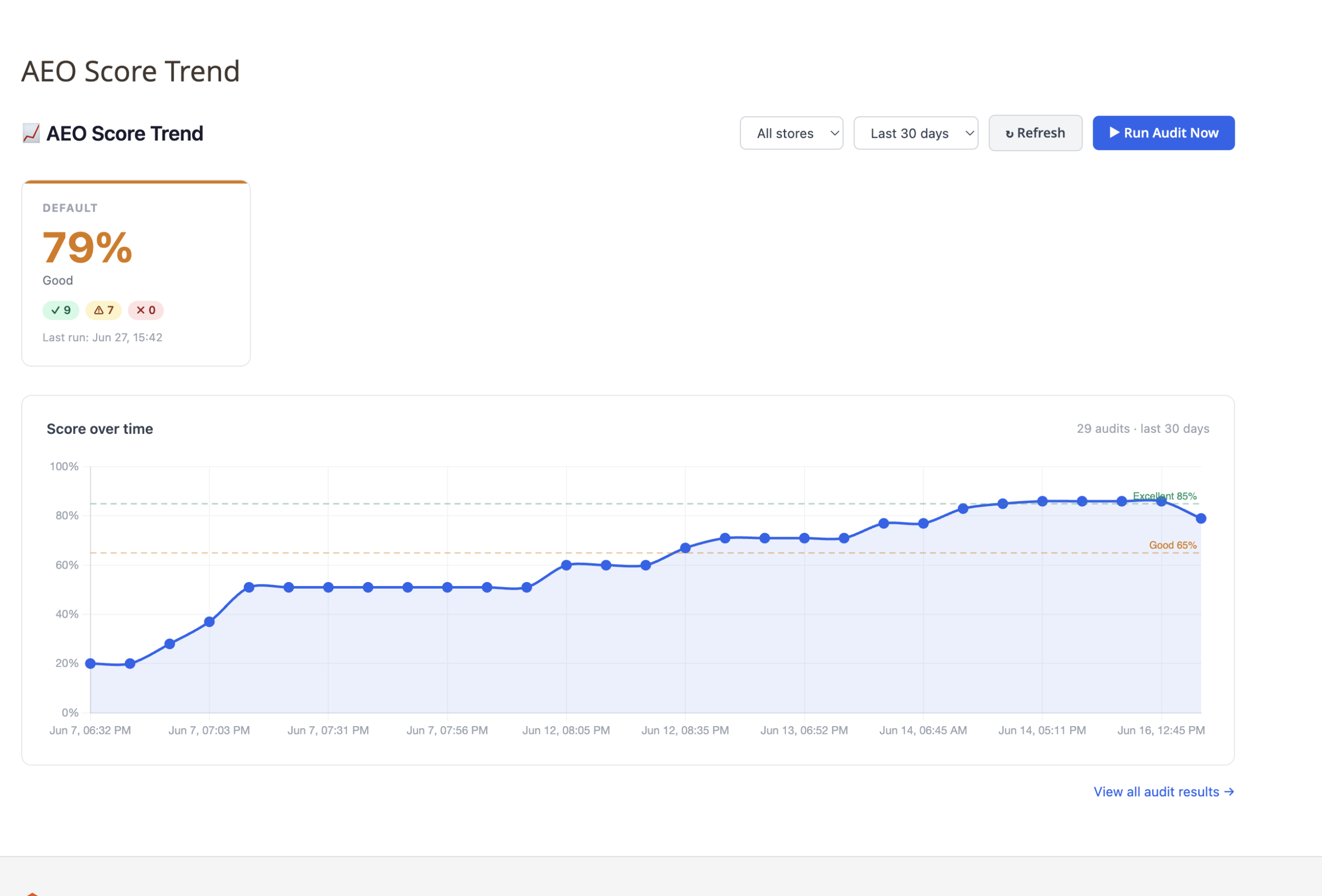
| Date | Score | P / W / F | What changed |
|---|---|---|---|
| Jun 7, 18:32 | 20% — Critical | 1 / 5 / 9 | Baseline |
| Jun 7, ~19:00 | 28% | 2 / 5 / 8 | robots.txt — AI bots allowed |
| Jun 7, ~19:03 | 37% | 3 / 5 / 7 | llms.txt + llms.jsonl |
| Jun 12 | 51% | 4 / 7 / 4 | Product + Organization JSON-LD |
| Jun 12–13 | 60→77% | — | UCP, merchant policies, schema breadth |
| Jun 13, 23:48 | 83% — Good | 9 / 6 / 0 | Last failure cleared |
| Jun 14+ | 86% — Excellent | 11 / 5 / 0 | Full core stack live |
The surprise: the cheapest fix moved the most
Going in, we assumed Product schema would dominate the score. It didn’t. The single highest-leverage change was robots.txt.
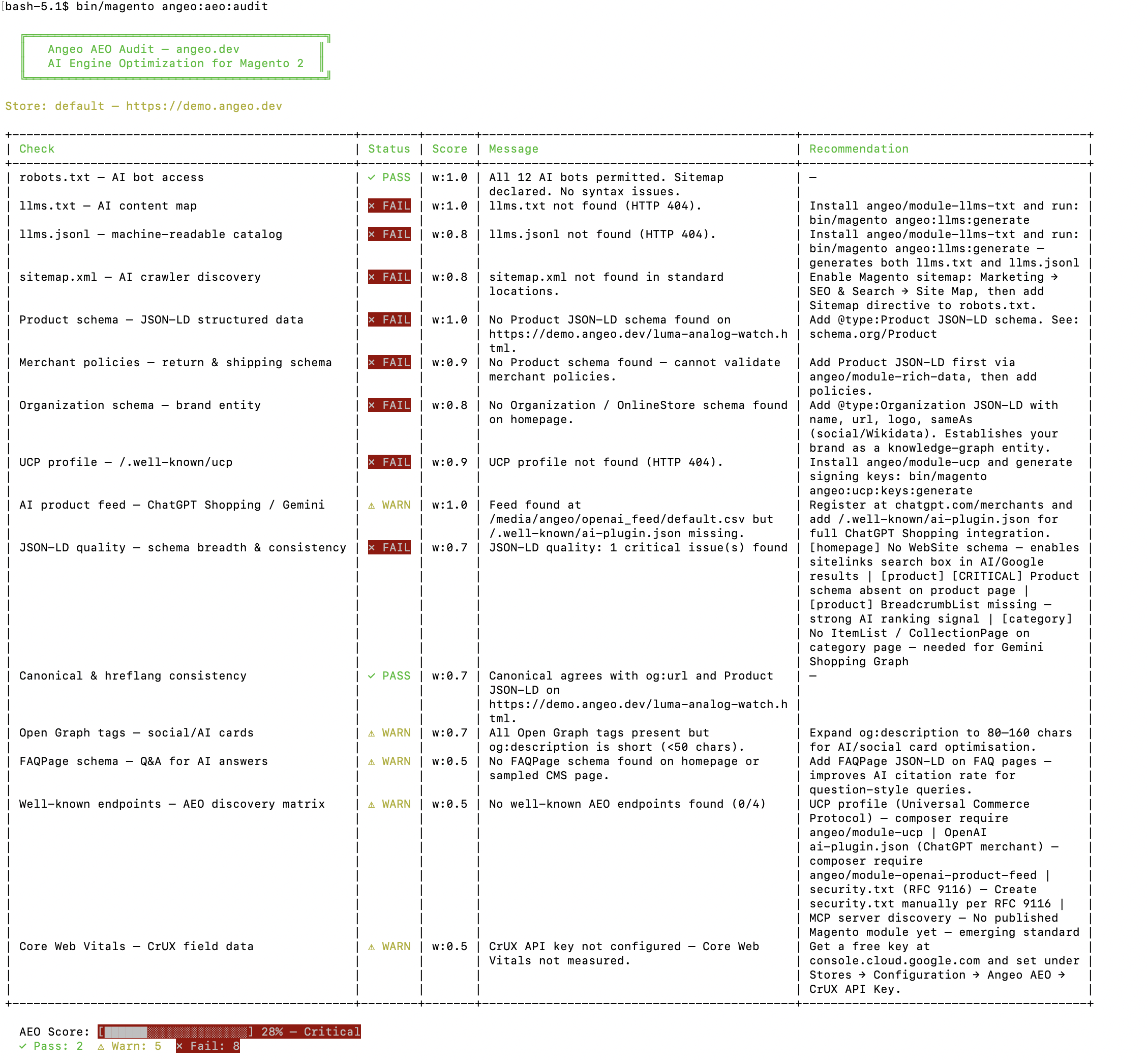
robots.txt change the score jumps from 20% to 28% — the robots.txt check flips to PASS while everything downstream still fails.Magento’s default file was written for Google years ago and names none of the modern AI indexers. Until it explicitly allows them, OpenAI’s OAI-SearchBot, GPTBot, PerplexityBot, ClaudeBot and Google-Extended never reliably crawl the store — so nothing else you do downstream can even be seen.
We expected structured data to make the biggest difference. The first major jump came from a one-line crawler-access fix. Visibility starts with permission to be crawled — everything else is downstream of that.
The content map: llms.txt + llms.jsonl
The next step generated two files in one command:
bin/magento angeo:llms:generate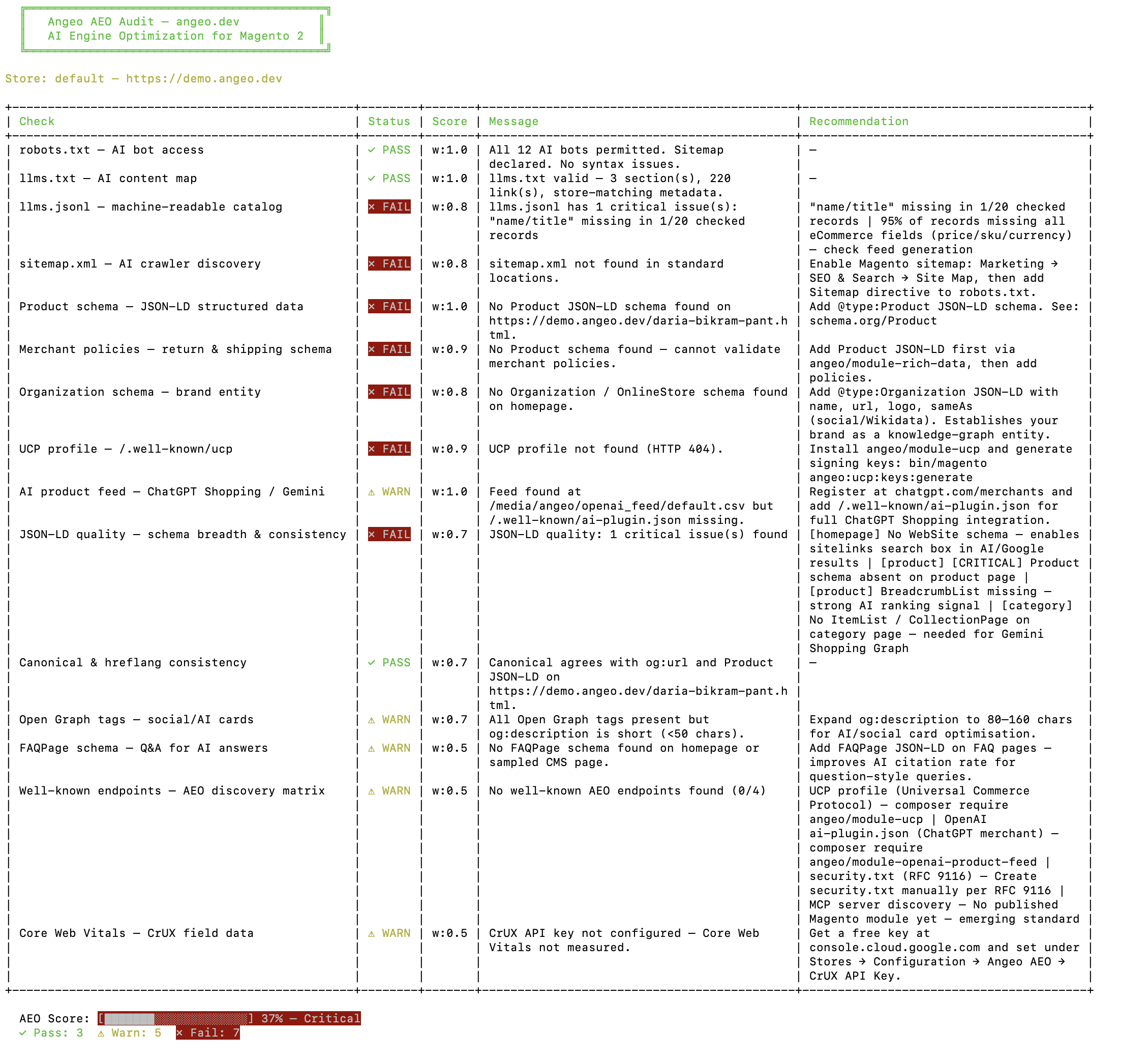
llms.txt and llms.jsonl in one command takes the store to 37% — the content-map check now passes with 3 sections and 220 links.llms.txt is a small Markdown file at the site root that tells an LLM what the store is and where its key pages live. It’s an open proposal (llmstxt.org) that crawlers such as Perplexity have publicly supported. The cleanest way to think about it: where robots.txt tells crawlers what not to index, llms.txt helps reasoning models understand what the site actually contains. Its sibling, llms.jsonl, is a line-delimited catalog where each line is one self-contained product record, which is far easier for a model to ingest than scraping rendered HTML. The run produced a valid llms.txt (3 sections, 220 links) and 221 catalog records.
Structured data carries most of the weight
The heaviest checks (weight 1.0) are Product JSON-LD and the AI product feed. Valid Product schema with AggregateRating and BreadcrumbList, plus Organization schema for brand-entity disambiguation, is what carried the store from “Good” into “Excellent.” By June 14 it held 86% with zero failures.
The plot twist: back down to 79%
Most case studies stop at the peak. Here’s what happened next. On June 27:
AEO Score: 79% — Good
✓ Pass: 9   ⚠ Warn: 7   ✗ Fail: 0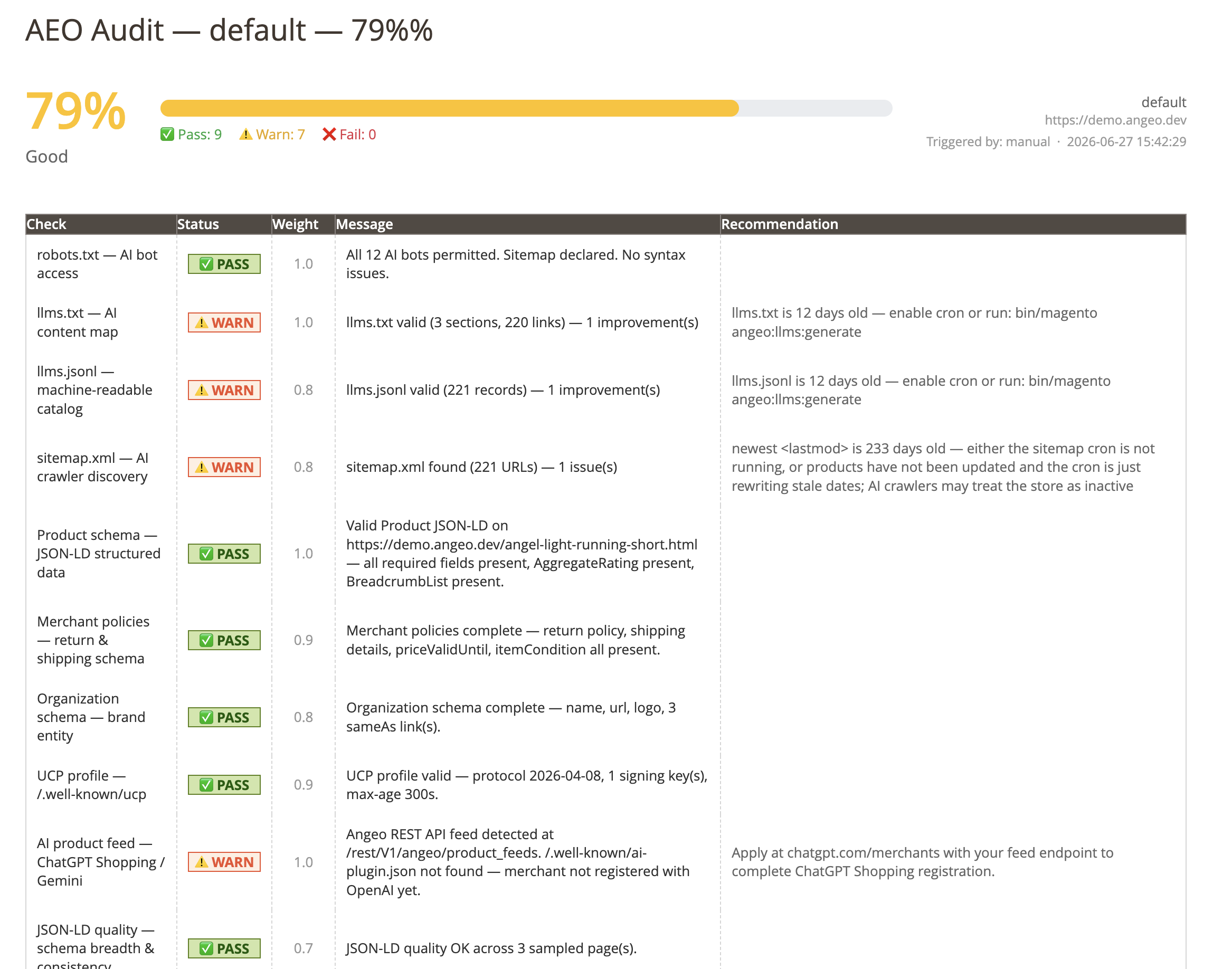
llms files (12 days old) and an old sitemap <lastmod> (233 days) push three checks from PASS to WARN.Still zero failures, but seven points below the peak — with no code change. Three checks had slipped from PASS to WARN for one shared reason: staleness.
| Check | Status | Why |
|---|---|---|
| llms.txt | ⚠ WARN | 12 days old — regenerate via cron |
| llms.jsonl | ⚠ WARN | 12 days old — same fix |
| sitemap.xml | ⚠ WARN | Newest <lastmod> 233 days old — looks inactive |
To a model revisiting the site, a months-old sitemap and a two-week-old content map read as a store that may no longer be trading — so it gets quietly down-weighted against rivals whose data looks live. The fix is mundane: run Magento cron so these files regenerate on a schedule. The lesson is not: an AEO setup is something you maintain, not something you finish.
What “Excellent” unlocked
The score isn’t vanity — the same audit measures real recall inside AI models, and on this store that check passed:
These rates were measured across 3 representative test prompts sent to the model and scored for whether the store was mentioned, recommended, and cited by URL. It’s a small sample — a directional signal, not a statistical claim — but the direction is unambiguous: a store that was invisible now appears in every test prompt and gets cited each time (overall 87/100, grade B). That’s the line between existing and not existing inside an AI-generated answer.
The three biggest lessons
If you remember nothing else
- Visibility starts with crawlability. If AI indexers can’t enter, no amount of schema matters. Fix
robots.txtfirst. - Structured data carries most of the score. Product, Organization and policy JSON-LD are where the weight lives.
- Freshness rivals correctness. Stale files decay your score on their own. Cron is not optional.
The replication recipe
- Fix
robots.txt— allow AI indexers, declare the sitemap. (Best score-per-effort.) - Generate the content map —
llms.txt+llms.jsonl. - Enable & verify the sitemap — Marketing → SEO & Search → Site Map.
- Add Product JSON-LD — required fields plus
AggregateRatingandBreadcrumbList. - Add Organization + policy schema —
hasMerchantReturnPolicyandshippingDetailshave been required by Google and ChatGPT Shopping since Jan 2026. - Publish the UCP profile —
/.well-known/ucpfor agentic commerce. - Run cron — and keep it running. Everything above decays without it.
Limitations
Read honestly, this study has boundaries worth stating:
• It measures technical AI readiness, not traffic or revenue. A higher score improves discoverability; it does not guarantee a model will recommend you.
• The audit score is not a published ranking factor of any AI system — it’s a proxy for the signals those systems are known to read.
• Results come from a single demo store. For rough context, based on our internal sample of audits, untouched Magento installs tend to cluster near 20–25%, and partially-optimized stores commonly sit in the 45–70% range before deliberate AEO work — but these are observations, not a controlled benchmark.
• AI-search standards move fast — re-audit periodically rather than trusting a one-time result.
What’s next for this store
The roadmap from here is about durability, not one-off gains: automatic llms regeneration on catalog changes, product-feed freshness checks, Merchant Center synchronization, and completing ChatGPT Shopping registration. We’ll re-audit and update this study as those land.
FAQ
What is an AEO score for a Magento store?
An AEO (Answer Engine Optimization) score measures how visible a Magento store is to AI answer engines such as ChatGPT, Gemini, Perplexity and Claude. It checks signals like AI-indexer access in robots.txt, the presence of llms.txt and llms.jsonl, Product and Organization JSON-LD, a fresh sitemap, and a UCP profile, then returns a single weighted percentage from Critical to Excellent.
Why does a default Magento 2 store score around 20%?
Magento’s defaults predate the AI-search era. AI indexers aren’t explicitly allowed in robots.txt, there’s no llms.txt or llms.jsonl content map, product pages emit microdata rather than the JSON-LD that models prefer, and there’s no agentic-commerce profile. It’s the out-of-the-box state, not a bug.
How long does it take to improve a Magento AEO score?
Less time than the calendar suggests. The first two fixes — robots.txt and generating llms.txt/llms.jsonl — take minutes and produce an immediate jump (20% to 37% in this study). A typical mid-size store reaches a strong score in roughly 90 minutes of focused work; the full set of fixes here took a few hours spread across a few sessions. The three-week span in our data is calendar time, not effort — we left the store idle between sessions on purpose to see how the score behaves over time.
Why did the score drop from 86% to 79%?
Stale data, not broken code. The llms files were 12 days old and the sitemap’s newest lastmod date was 233 days old, so three checks dropped from PASS to WARN. Models read stale signals as a possibly-inactive store. Running cron to regenerate the files on a schedule prevents the decay.
Does a higher AEO score guarantee AI recommendations?
No. The score measures technical readiness — whether AI systems can discover, parse and trust the store. That improves the odds of being mentioned and cited, but recommendation also depends on price, relevance and competition. Readiness is necessary, not sufficient.
Where does your store stand?
Run the same open-source audit used throughout this study and get back:
- your overall AEO score, Critical → Excellent
- every failing and at-risk check
- a prioritized list of fixes
- AI-visibility recommendations specific to your catalog
bin/magento angeo:aeo:auditAll figures come from audits run against the demo store demo.angeo.dev between 7 and 27 June 2026 using the open-source angeo:aeo:audit CLI. Scoring weights reflect the framework as of June 2026; AI-search standards evolve quickly.