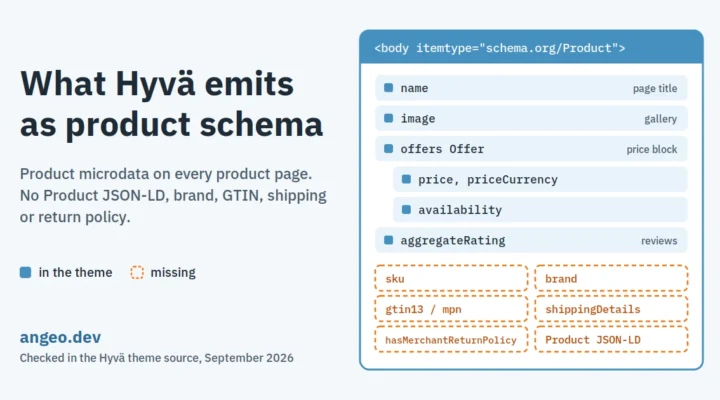
Hyvä marks every product page as a schema.org/Product microdata item. The page <body> carries the Product type, the title carries its name, the gallery its image, and the price block an Offer with price, currency and availability. What Hyvä does not emit is Product JSON-LD, and the fields shopping surfaces use to match and trust a product: sku, brand, GTIN, shipping and return policy.
The July 2026 version of this page said Hyvä renders an Offer with no Product around it. That was wrong. The Product item is declared in the layout file catalog_product_view.xml, on the <body> element, not in a template – and our search only looked at templates. It has been there since at least Hyvä 1.1.0. This version is checked against the layout XML and the templates of the main branch (20 August 2026) and tags 1.1.0 and 1.4.4.
What Hyvä emits
| Property | How | Source file |
|---|---|---|
| Product item | <body itemscope itemtype="https://schema.org/Product"> | catalog_product_view.xml |
| name | itemprop=name on the page title | catalog_product_view.xml |
| image | itemprop="image" on the main gallery image | gallery.phtml |
| offers | Offer with price, priceCurrency, priceValidUntil (when set) and availability | price.phtml |
| aggregateRating, review | Rating value, count and review items | Magento_Review/templates/ |
| BreadcrumbList | JSON-LD, can be switched off by a layout flag | breadcrumbs.phtml |
All of it is server-rendered, so crawlers that do not run JavaScript still receive it. Availability comes from the product’s salable status and is written as http://schema.org/InStock or http://schema.org/OutOfStock – schema.org accepts both http and https.
What Hyvä leaves out
| Missing | Why it matters |
|---|---|
sku | Identifies the product in feeds and agent calls |
brand | Most shopping questions name a brand |
gtin13 / mpn | Matches your listing to the same product elsewhere |
description | Only review texts carry description, not the product |
url, itemCondition | Expected on an Offer |
shippingDetails | Answers “how much and how fast to ship” |
hasMerchantReturnPolicy | Answers “can I return it” |
Two practical risks come on top. The microdata is spread over several templates, so a theme override of the title, gallery or price block can silently break the chain. And there is no @id, so the product cannot be referenced from other nodes, such as a breadcrumb or an organization.
The fix: add Product JSON-LD
Render a complete Product JSON-LD block on the server, from the same product data the templates use. Give it an @id. Keep the prices and availability identical to what the page shows.
{
  "@context": "https://schema.org",
  "@type": "Product",
  "@id": "https://shop.example/cast-iron-skillet-26cm.html#product",
  "name": "Cast Iron Skillet 26cm",
  "url": "https://shop.example/cast-iron-skillet-26cm.html",
  "sku": "SKILLET-26",
  "gtin13": "0123456789012",
  "brand": {"@type": "Brand", "name": "Example Brand"},
  "image": "https://shop.example/media/catalog/product/skillet.jpg",
  "description": "Pre-seasoned cast iron skillet, oven-safe to 260 °C.",
  "offers": {
    "@type": "Offer",
    "url": "https://shop.example/cast-iron-skillet-26cm.html",
    "price": "89.00",
    "priceCurrency": "EUR",
    "availability": "https://schema.org/InStock",
    "itemCondition": "https://schema.org/NewCondition",
    "shippingDetails": {"@type": "OfferShippingDetails",
      "shippingRate": {"@type": "MonetaryAmount", "value": "4.90", "currency": "EUR"},
      "shippingDestination": {"@type": "DefinedRegion", "addressCountry": "NL"}},
    "hasMerchantReturnPolicy": {"@type": "MerchantReturnPolicy",
      "applicableCountry": "NL",
      "returnPolicyCategory": "https://schema.org/MerchantReturnFiniteReturnWindow",
      "merchantReturnDays": 30}
  }
}
You can leave Hyvä’s microdata in place: two representations are fine as long as they agree. angeo/module-rich-data emits this JSON-LD on Luma and Hyvä, independent of the theme. Only add aggregateRating when real reviews exist.
How to check your store
# Product microdata on the body (expect: itemtype="https://schema.org/Product")
curl -s https://shop.example/some-product.html | grep -o '<body[^>]*itemtype="[^"]*"'

# Product JSON-LD (expect 1 or more after the fix)
curl -s https://shop.example/some-product.html | grep -c '"@type": *"Product"'
Then run one simple, one configurable and one out-of-stock product through Google’s Rich Results Test and validator.schema.org. Check that price and availability match the page and your product feed.
Questions
- Does Hyvä output Product schema?
- Yes, as microdata. The product page
<body>is a schema.org/Product item with name, image, an Offer with price, currency and availability, and ratings. It does not output Product JSON-LD. - What Product fields does Hyvä leave out?
- sku, brand, GTIN and MPN, the product description, url, itemCondition, shippingDetails and hasMerchantReturnPolicy. These are the fields shopping surfaces use to match and trust a product.
- Is Hyvä’s microdata enough for Google?
- It is valid and can show in the Rich Results Test. For merchant listings Google also asks for identifiers, shipping and return details, which Hyvä does not emit.
- Should I remove Hyvä’s microdata when I add JSON-LD?
- Not necessarily. Two representations are fine if they agree. What causes trouble is different prices or availability in the two, so generate both from the same product data.
- Did this page say something different before?
- Yes. The July 2026 version said Hyvä has no Product entity. That was wrong: the Product item is declared in the layout file, not in a template, and our search missed it. This version is checked against the layout XML.
Related
- Magento 2 Product JSON-LD for AI search
- offers.availability – definition
- Entity @id in JSON-LD – definition
- The product description AI cannot read
- Module: JSON-LD schema for Magento 2