You installed robots.txt rules for GPTBot and OAI-SearchBot. You generated llms.txt. You added Product schema. The AEO audit is mostly green.
And ChatGPT still recommends your competitor.
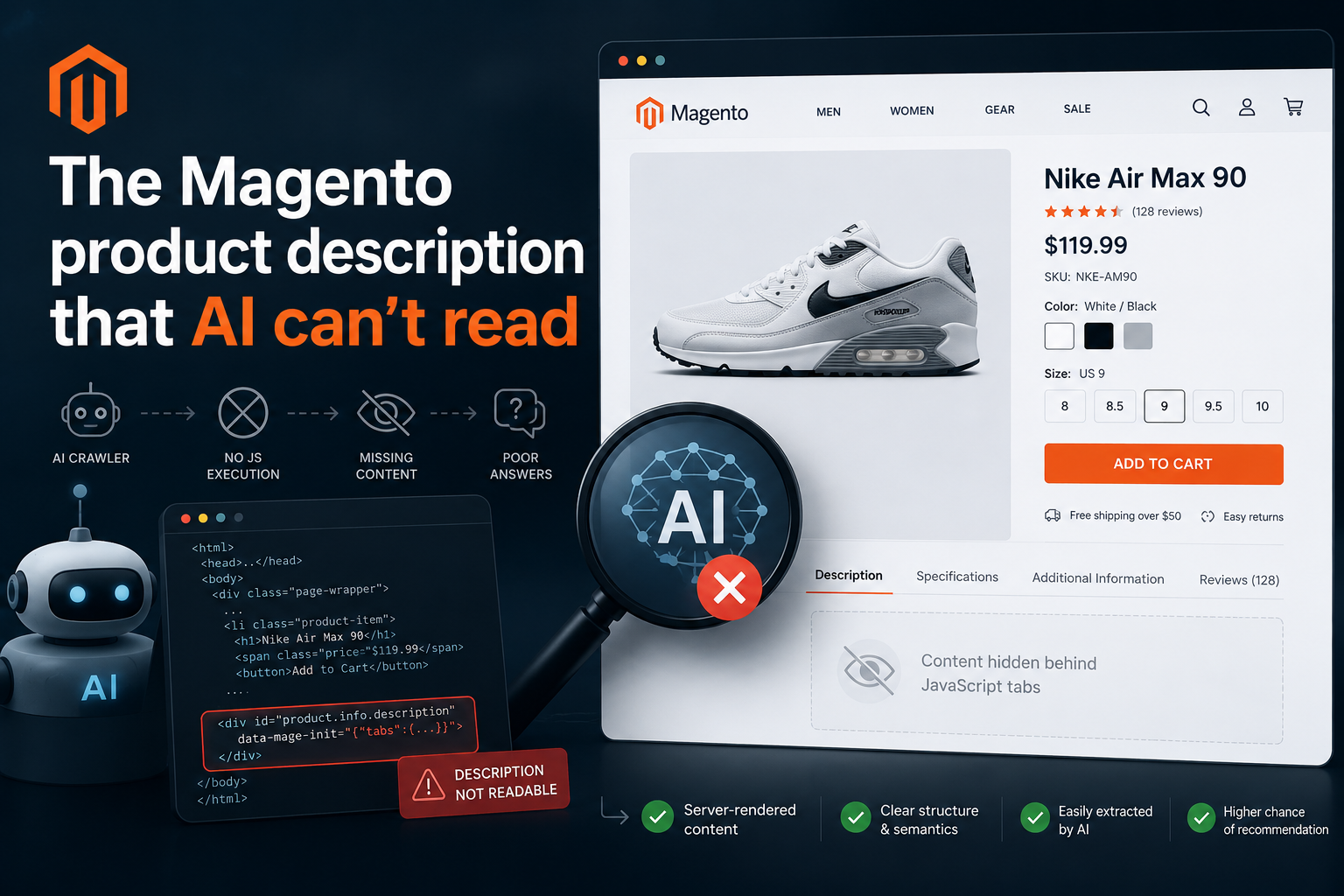
There is a good chance the problem is not in any of those signals. It is in your product page itself — and specifically in how Magento renders product content relative to what AI extraction systems actually process.
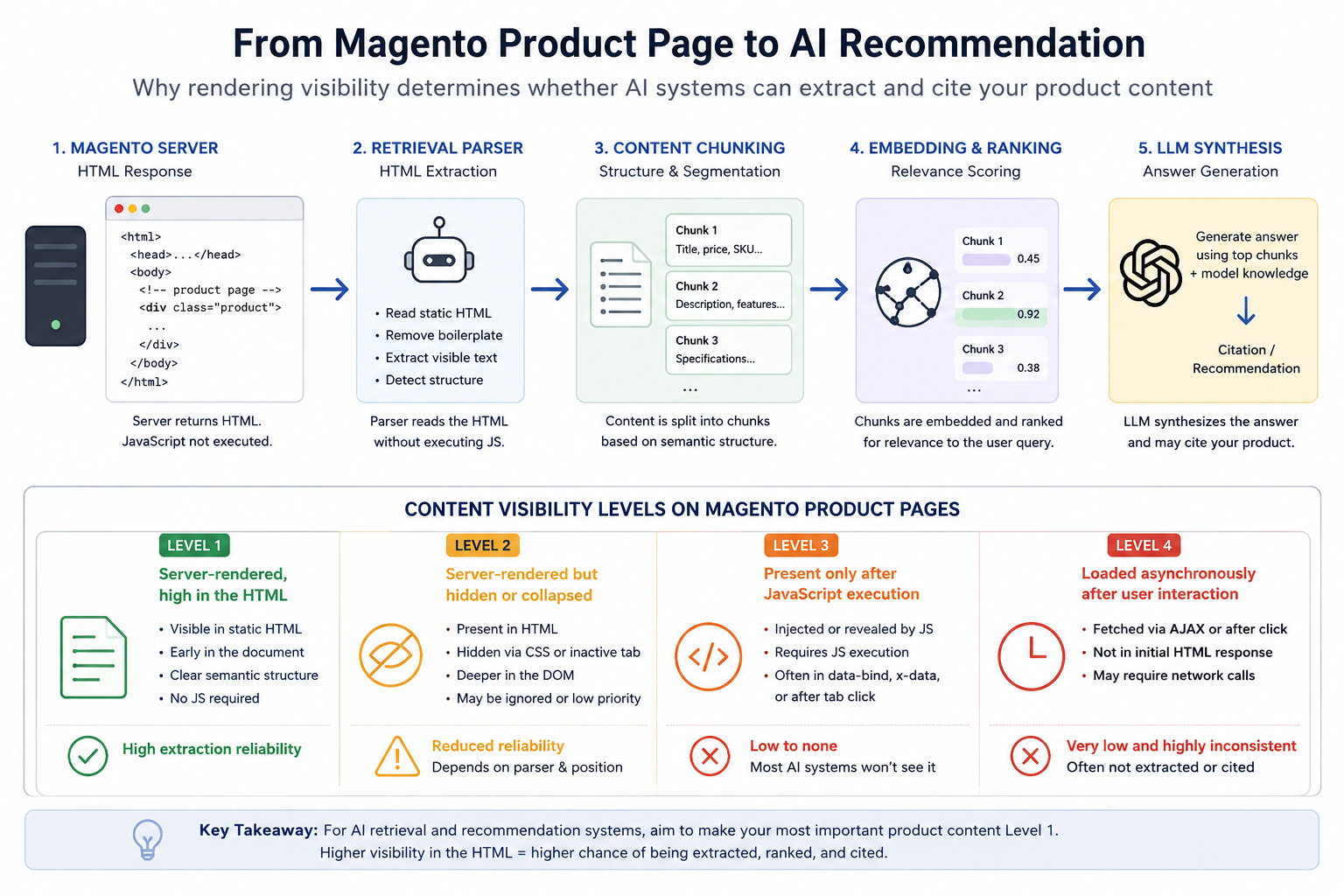
How your product page travels through an AI recommendation system
Before fixing anything, it helps to understand what actually happens between a crawler visiting your store and your product appearing — or not appearing — in a ChatGPT recommendation.
Magento HTML response
         ↓
AI crawler fetches raw HTML
(limited or inconsistent JavaScript rendering)
         ↓
Extraction layer
parses text, headings, structured data
         ↓
Content chunking
splits page into retrievable units
         ↓
Relevance scoring
ranks chunks against query intent
         ↓
LLM answer synthesis
selects candidates for the response
         ↓
Citation / recommendation
The extraction layer is where most Magento stores lose. If your product description is difficult to find, collapsed behind interaction, or rendered in a way that makes structural parsing ambiguous — your product may never become a strong candidate during retrieval and ranking for comparative prompts like:
- “best trail running shoes under €150”
- “comfortable sneakers for all-day walking”
- “running shoes with visible air cushioning”
In comparative recommendation prompts, extraction systems rarely evaluate your product in isolation. They compare extracted chunks from multiple stores simultaneously. The cleaner and earlier your product information appears in the HTML, the more competitive your product becomes during candidate selection — against every other store that sells the same thing.
This is not an indexing problem. It is a retrieval problem. The distinction matters because it affects what you need to fix.
Content visibility is not binary
Traditional SEO treats content as either indexed or not. For AI extraction systems, the picture is more granular. In practical audits across Magento stores, product page content tends to fall into at least four levels:
| Level | How the content exists | Extraction reliability |
|---|---|---|
| 1 | Server-rendered, early in HTML | High |
| 2 | Server-rendered but hidden or collapsed | Reduced — parser-dependent |
| 3 | Present in DOM only after JS execution | Low — often inconsistent |
| 4 | Loaded asynchronously after interaction | Very low and highly inconsistent |
Traditional SEO often treats levels 2, 3, and 4 as “indexable enough” — and for Googlebot, which runs a full headless Chrome rendering pipeline, that is broadly true. Most AI crawlers do not reliably execute full client-side rendering flows the way modern browsers do. Even where partial rendering exists, JavaScript-dependent content is significantly less reliable for AI extraction and answer synthesis than server-rendered HTML.
Many extraction pipelines also prioritise early-page content, semantic structure, headings, and concise HTML regions. Content that sits deep in nested containers, behind collapsed UI, or delayed by hydration often receives lower extraction priority due to token and latency constraints — even when it is technically present in the DOM.
For AI systems, the question is not just “is this content in the HTML?” but “will the extraction layer find it, chunk it correctly, and score it as relevant during answer synthesis?”
What typically happens on a default Magento product page
Magento 2’s standard product page layout wraps descriptions and attribute groups inside a tabs widget defined in Magento_Catalog::product/view/details.phtml. The initialisation uses data-mage-init='{"tabs": {...}}' — a RequireJS-driven widget.
The behaviour varies by implementation:
- In most Luma configurations, the description is present in the server-rendered HTML — but marked inactive, collapsed, and positioned deep in the document after significant structural scaffolding
- In some configurations, content is injected only after the tab receives a click event
- Across all standard configurations, the description typically appears after hundreds of characters of navigation markup, widget configuration JSON, form keys, and boilerplate
Even at Level 2 — technically in the HTML — the position and surrounding structure affect how reliably the extraction layer treats the content. A product description that appears as the eighth or ninth region of meaningful content, inside a collapsed tab container, competes poorly against a competitor’s description that appears as clean prose high in the document.
Run this to see your actual HTML output:
curl -s "https://yourstore.com/your-product-url.html" \
  | python3 -c "
import sys, re
html = sys.stdin.read()
text = re.sub(r'<[^>]+>', ' ', html)
text = re.sub(r'\s+', ' ', text).strip()
print(text[:3000])
"
What you want: product description text — materials, specifications, benefits — appearing clearly in those first 3000 characters, in readable form.
What commonly appears: product name, price, SKU, breadcrumb, button text, widget boilerplate, and very little substantive content until deep into the response.
Test what AI actually sees in 60 seconds
Method 1 — Source view:
Right-click your product page → “View Page Source” (not Inspect, which shows the rendered DOM). Use Cmd/Ctrl+F to search for the first sentence of your product description.
If it is not there — Level 3 or below. If it is there but appears after significant boilerplate — Level 2 with extraction risk.
Method 2 — curl test:
curl -s "https://yourstore.com/your-product.html" \
  | grep -c "your product description phrase"
Zero means Level 3 or 4. A result means at least Level 2 — but position and context still matter.
Method 3 — ask an AI directly:
What can you tell me about this specific product? [paste your product URL]
A generic response (“This appears to be a product page…”) rather than one specific to your product’s actual attributes and benefits typically means the indexing pipeline did not extract your description meaningfully — regardless of which level it sits at technically.
Three approaches to improve extraction reliability
These are ordered by implementation effort. The right choice depends on your theme and how your content is currently structured.
Approach 1 — Make the description tab active by default
The lowest-effort fix for a Level 2 situation. Setting the description tab as active on load means the content is not hidden at the CSS level when the page is fetched.
<!-- app/design/frontend/YourVendor/YourTheme/Magento_Catalog/layout/catalog_product_view.xml -->
<referenceBlock name="product.info.details">
    <arguments>
        <argument name="config" xsi:type="array">
            <item name="settings" xsi:type="array">
                <item name="active" xsi:type="boolean">true</item>
            </item>
        </argument>
    </arguments>
</referenceBlock>
This keeps the tab UI intact for human visitors while ensuring the description is exposed at page load. It moves content from Level 2 collapsed to Level 2 visible — a useful quick fix while you plan a more structural change.
Approach 2 — Render description directly in product info, above tabs
A structural fix that moves description content to Level 1 — early in the HTML, clearly associated with the product entity, before any tabs infrastructure. This gives extraction systems a clean, unambiguous target.
<!-- catalog_product_view.xml override in your theme -->
<referenceContainer name="product.info.main">
    <block class="Magento\Catalog\Block\Product\View\Description"
           name="product.description.above.tabs"
           template="YourVendor_Theme::product/description-visible.phtml"
           after="product.info.price"/>
</referenceContainer>
<?php
// view/frontend/templates/product/description-visible.phtml
/** @var \Magento\Catalog\Block\Product\View $block */
$description = $block->getProduct()->getData('description');
if (!$description) return;
?>
<section class="product-description-aeo" itemprop="description">
    <?= /* @noEscape */ $description ?>
</section>
This renders the description as server-side HTML, early in the document. You can keep the tabs further down the page for human navigation — the description appears in both places, but the extraction-friendly version is unconditional and structurally clean.
Approach 3 — Render all tab content into the initial HTML response
The most comprehensive approach. Override details.phtml to render all tab content into the HTML at page load. Tab visibility is then controlled by CSS on the active state rather than by content toggling.
<!-- Override of Magento_Catalog::product/view/details.phtml -->
<div class="product-tabs" data-mage-init='{"tabs":{"active":0}}'>
    <?php foreach ($block->getGroupChildNames('detailed_info') as $alias): ?>
    <?php $childBlock = $block->getLayout()->getBlock($alias); ?>
    <?php if (!$childBlock) continue; ?>

    <div class="data item title">
        <a data-toggle="trigger" href="#tab-<?= $block->escapeHtmlAttr($alias) ?>">
            <?= $block->escapeHtml($childBlock->getTitle()) ?>
        </a>
    </div>

    <div class="data item content"
         id="tab-<?= $block->escapeHtmlAttr($alias) ?>"
         data-role="content">
        <?= $childBlock->toHtml() ?>
    </div>
    <?php endforeach; ?>
</div>
The full content of every tab — description, specifications, additional attributes — is present in the initial HTML response. The tabs widget hides all but the active tab via CSS for human visitors. AI parsers reading the raw HTML see all of it cleanly.
Hyva Theme
Hyva replaces RequireJS tabs with Alpine.js components. The default Hyva product page uses x-show directives for tab visibility:
<div x-data="{ activeTab: 'description' }">
    <div x-show="activeTab === 'description'">
        <!-- content is in the HTML but gated by Alpine evaluation -->
    </div>
</div>
In Hyva, the description content is typically present in the HTML source — it does not require a click to inject. However, x-show directives and Alpine data bindings add structural noise around the content, and the relationship between the content and its context may be less clear to an indexing pipeline that does not evaluate the Alpine scope.
The most reliable fix for Hyva is progressive enhancement: render the description once outside the interactive container, as a clean server-side HTML block, early in the product layout. This gives the extraction layer an unambiguous target independent of the Alpine component state — not a crawler-specific workaround, but a standard architectural pattern that happens to be exactly what AI parsers prefer.
<!-- In your Hyva theme's catalog_product_view.xml -->
<referenceContainer name="product.info.main">
    <block class="Magento\Catalog\Block\Product\View\Description"
           name="product.description.retrieval"
           template="YourVendor_Theme::product/description-server.phtml"
           after="product.info.price"/>
</referenceContainer>
One clean, server-rendered block. Early in the document. No Alpine dependencies. Structurally unambiguous.
Server-side JSON-LD matters for the same reason
The same principle applies to Product schema. If your JSON-LD is generated by a JavaScript block, injected via GTM, or hydrated client-side, in many observed cases AI extraction systems do not see it — regardless of how complete the schema is.
It is worth understanding why this matters beyond the obvious. AI systems can often extract product semantics from visible content even without schema — they can infer name, price, and description from well-structured HTML. But when server-rendered JSON-LD is present, it creates a clean machine-readable shortcut: a structured summary of the product entity that the extraction layer can process deterministically, without inference. Client-side JSON-LD removes that shortcut entirely.
| Schema delivery method | Availability to AI parsers |
|---|---|
Server-rendered in <head> |
Reliable |
Inline in <body> before tabs |
Reliable |
| Injected by GTM after page load | Often unavailable |
| Hydrated by JS framework on mount | Often unavailable |
Deferred script with async / defer |
Inconsistent |
Verify your schema is in static HTML:
curl -s "https://yourstore.com/your-product.html" \
  | grep -o '"@type": "Product"'
If nothing returns, the schema is rendered client-side. In Magento, server-side JSON-LD is straightforward — any Block\Template class has access to getProduct() at render time, and the output goes directly into the HTML response.
What the difference looks like for an extraction system
Before — default Magento, description at Level 2, deep in document:
[~900 chars: navigation, breadcrumbs, price markup, button attributes,
 data-mage-init JSON, widget config, form keys, UI boilerplate]

 "description": "The Nike Air Max 90 features visible Air cushioning..."

[content buried, collapsed, structurally ambiguous]
After — description at Level 1, early in document:
[~120 chars: minimal structural markup]

The Nike Air Max 90 is built for all-day comfort with visible Air
cushioning in the heel. Upper: leather and synthetic mesh. Weight: 310g
(UK 8.5). Outsole: rubber, minimum 20% recycled content. Sizes: EU 38–47.

Key features:
- Visible Air unit in heel: impact absorption during walking and running
- Foam midsole: lightweight cushioning
- Waffle-pattern rubber outsole
- Available in 12 colourways
The second version is what an extraction system encounters when deciding whether your product is a strong candidate for “best running shoes with visible air cushioning.” Clean prose, specific facts, high on the page, structurally unambiguous. The first version competes against competitors whose descriptions are served exactly this way.
Summary
Most AEO guides for Magento focus on what to add — llms.txt, schema, AI bot permissions. This problem is about how content is exposed: its position in the document, whether it is server-rendered, and whether AI extraction systems can reach it reliably without executing JavaScript or waiting for user interaction.
This is not a question of whether your content exists. It is a question of whether it is structurally accessible to the indexing pipeline that determines your product’s candidacy for AI recommendations.
The fix in most cases takes under an hour. Layout XML overrides, no new modules, no API keys. Run the curl test on your top-selling product now. If the description text is not readable in the first few thousand characters of the source — cleanly, without structural scaffolding around it — you know where the gap is.
angeo/module-aeo-audit checks rendering visibility alongside robots.txt, llms.txt, schema, and six other AEO signals in one CLI command.



0 Comments